01
Bring your narration
Upload a recording, or a video whose sound is used. Paste a script for a narrator voice to read, or start from an idea. Your recording is transcribed and split into scenes at its natural pauses.
For narrated YouTube videos · Early access
Upload a voiceover. Prism finds the scenes, turns every line into original artwork in one consistent style, and times the captions to your words. Then you fine-tune it in a live editor and export an MP4.
Made for channels about
Recording a voiceover takes an afternoon. Turning it into something people keep watching takes days: finding or commissioning a picture for every line, cutting on the pauses, timing captions word by word, keeping the same character looking the same from scene to scene.
That is the part Prism does with you, so you can spend your time on the story and publish on schedule.
How it works
Upload a recording, or a video whose sound is used. Paste a script for a narrator voice to read, or start from an idea. Your recording is transcribed and split into scenes at its natural pauses.
Each line of your narration becomes a picture prompt, and each prompt becomes an original illustration made for your video, in the style you chose. Read and rewrite any prompt, make a new version, or upload your own picture instead.
Choose a picture style, mood and palette, and add reference images. Name your recurring characters and places once, and they look the same in every shot they appear in.
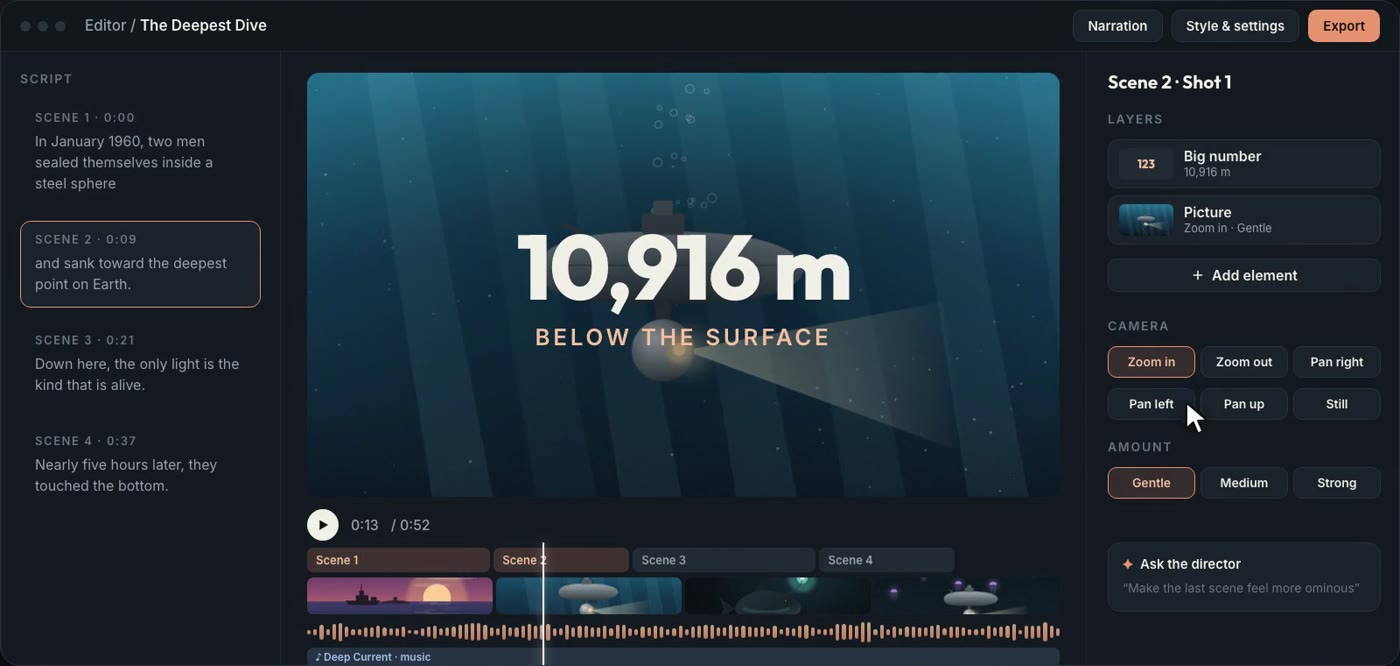
Adjust camera moves, timing and transitions with a live preview. Style your captions, add music, and export an MP4 in 16:9 for YouTube or 9:16 for Shorts.
Features
Every shot gets an illustration made from your narration, in the style you chose. No stock footage, no hunting for images.
Your voice leads. Scenes follow the pauses in your recording, not a fixed clock.
Name your recurring characters, places and objects, add reference images, and they look the same in every shot.
Captions light up word by word. Choose the typeface, highlight colour, outline or box, size and caps.
Zoom in, zoom out or pan across every picture, from gentle to strong, so stills feel alive.
Drop a title, a list, a big number or a quote over any shot, with the picture still showing behind it.
Add a background track that carries through the pauses and fades out with your ending.
Episodes in a project share its look, captions, voice, cast and music, so a channel stays on brand.
You direct
Drafts are a starting point, never a takeover. Everything is visible, editable and yours to keep.
FAQ
No. Prism is made for narrated, faceless videos: your voice (or a narrator voice) over pictures. The shot list, timing, captions and camera moves are drafted for you, and everything stays editable.
Yes, and it works best that way. Upload an audio file, or a video whose sound will be used. You can paste your script too, so the words come out exactly as you wrote them.
Paste the script and pick a narrator voice to read it, or start from an idea and shape a draft script first.
Yes. Every shot can use a generated picture, one you upload, or one from your project’s library. Picture prompts are always visible and editable.
An MP4 in 16:9 for YouTube, or 9:16 for Shorts and other vertical feeds.
No. Changes you make by hand are kept. New pictures arrive as options and never replace one you chose.
Only you. Projects, recordings and exports are private to your account.
Bring the voiceover. Leave with a video that’s ready to upload.
Start your first video